Ebook reader with ambience and built-in drafting tools
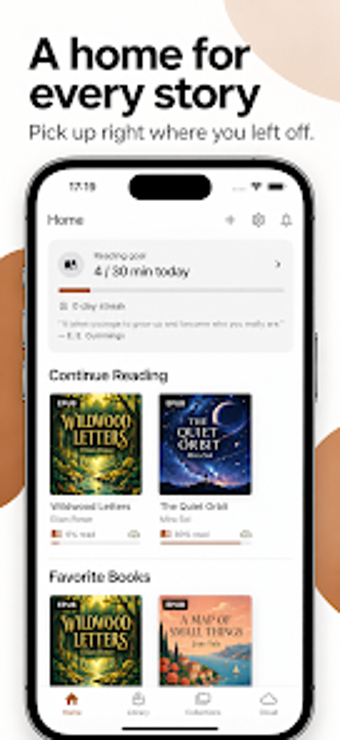
Opens EPUB, PDF, MOBI, AZW3 and Word files while adding ambient soundscapes such as rain, fireplace, and forest to the reading session. OwlNest Reader, from Owl Studio Inc, targets avid readers and writers on Android, offering library organization, reading goals, and an integrated chapter-based composer. The app aims to serve users who keep DRM-free collections and want a distraction-reduced space for reading, annotating, and drafting manuscripts or research notes.
What formats does it handle and how does mobile PDF reading work?
The reader accepts EPUB, PDF, MOBI/PRC, AZW3, and DOC/DOCX, plus on-device EPUB conversion, which lets you import legacy Word files and several ebook formats without external tools. For small, text-heavy PDFs the app offers an advanced reflow mode that repaginates content for narrow screens, making line length and font scaling more readable on mobile devices.
How does it support learning, memory, and writing workflows?
The app combines reading analytics and a writing workspace: it records reading goals and session statistics to help users build habits, and it bundles a chapter-based "My Drafts" composer for story or research writing. The package also includes an offline English dictionary, which supports lookup during study sessions without an internet connection.
Is it appropriate for students, writers, or readers who manage large libraries?
Library tools include collections, favorites, and fast search, which help organise large DRM-free ebook sets. Cross-device synchronization preserves progress, annotations, and drafts when you sign in. An optional PIN lock secures the library and drafts, a privacy feature useful for classroom devices or shared tablets used by students and writers.
Useful for focused readers and writers who control their own DRM-free libraries
OwlNest Reader is a useful option for students, independent readers, and authors who want a calm, single app for reading, annotating, and drafting. Its privacy lock and session statistics support disciplined study and private composition. Note that the app concentrates on DRM-free material, so books protected with DRM are not part of its workflow.